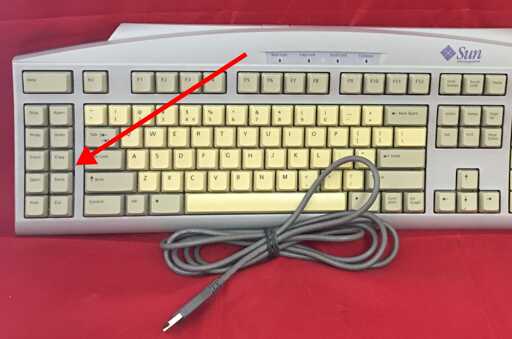
there’s a growing adoption of keyboards with custom firmware– programmable keyboards
- There’s an error
- You have computers? We have computers to send keystrokes to our computers!
Edit: i mean, there’s software to remap your keyboard.
Wait till you find out that your SSD has it’s own CPU, RAM and is running software on it’s own micro-OS just for writing bits to flash storage.
Wait even more until you find out the same is true for your SIM card.
If you survive the shock, you could go on and write software that runs entirely on your SIM card in fucking JAVA.
Sup dawg. I heard you like microprocessors.
My patch to add Copy/Paste keycode support to the Cosmic Terminal was merged!
As someone who likes Rust but dislikes the look of COSMIC, are there plans to allow theming?
There are already settings to change some of the colors used.
For the terminal in particular there is an option to hide the menu bar, making it look as Foot or Alacritty do.
There is an unintended benefit to putting an obstacle between people who don’t know how to use the terminal and pasting code into it.
Expanding on this, we could make it so that root must use ed(1) to edit files?
you’re evil. i love it.
No, only vi
vi is so outdated, we use viii now. You’re two versions behind!
“Ed is the standard text editor.”
Ha! Butterflies!
I used to have a Linux keyboard (with Tux instead of the Windows logo on super) with dedicated copy and paste keys. As far as I recall I never used them.
On old keyboards with those dedicated Copy/Paste keys, they weren’t easy to reach.
Now with programmable keyboards and layers, they can be as convenient as Control C & V.
On the software side, there were many years where they weren’t well-supported, but that’s changing now.
I found this handy snippet to enable these keys in GTK 2 and 3 (not sure of the equivalent for GTK 4 but I guess that’s the one which has been updated anyway): https://forum.colemak.com/topic/1438-dreymars-big-bag-of-keyboard-tricks-linuxxkb-files-included/#p10012
Unfortunately I’ve found this whilst I’m not at the right computer so I haven’t been able to test them.
Edit: I tested this and it doesn’t appear to have helped.
sigh can’t believe that no one mentioned that there is a default set of shortcuts that are used across all GNU programs, and it’s been the default since way before Ctrl+C/Ctrl+V existed. You can easily copy/paste stuff in any terminal using the same keypresses you would on Emacs, I.e. Ctrl+space to start selection, Alt+W to copy and Ctrl+Y to paste. In fact you can navigate the entire line the same way, not just copy/pasting but moving back and forward, selecting and deleting stuff, e.g. Ctrl+A Ctrl+K cuts the entire line.
Unless you activate Vi mode (which most terminals support) and then you can use the same keypresses you would on Vi, including
ci"and other cool stuff that’s much more powerful that simple copy/paste.There is a default, it’s just not the same as word uses.
You describing a kill ring which is internal to the shell and not synced to the system clipboard. Nor does it work in GUI apps.
The benefit of universal bindings is not have to learn one method for GUI apps, another for terminals and a third for shells implementing the kill-ring like bindings.
Ctrl+Ins gang rise up
That’s why we have mice copy/paste bindings on most systems too. Highlighting text auto copies, and scroll wheel click pastes. Not all do this, but many do and have for a while.
That’s a popular terminal feature, but I regularly get tripped up because my terminal has that behavior but my browser does not.
That’s what’s nice about a global solution.
in most systems this is global. it’s provided by the desktop and programs just see a copy/paste event. are you on wayland by any chance?
Yes.
yeah that’d do it. on X11 this is a solved problem, but wayland delegates the responsibility to the wm, and i don’t think anyone other than gnome has actually implemented it. another one of the paper cuts that makes it hard for me to make the switch.
I’m on Sway and I use the mouse copy and paste all day everyday.
Switch to a non-buggy browser.
There’s only two. One has broken primary selection, the other has anti-user policies against adblock plugins.
I can live without copy on highlight. But you could pry UBlock Origin from my cold, dead hands.
uBlock Origin and mouse copy and paste works perfectly well in Firefox.
Copy on select and middle mouse button paste doesn’t work in text fields created by js code in Firefox. I remember finding a stale bug report for it,
but can’t find it.There are a lot of websites that use javascript to create text fields, some recent examples that I can remember right now:
- codewars.com
- claude.ai
- vscode.dev
Edit: found report: https://github.com/codemirror/codemirror5/issues/931
https://bugzilla.mozilla.org/show_bug.cgi?id=1593761
Mice? What is this thing you talk of?
Mice is animal
Mouses is computer/human interface device.
Pretty sure it’s mice for both, that’s just the correct plural for mouse, and the computer mouse literally got it’s name from the animal.
We started calling wireless mice hamsters because they got no tail.
And the second is going extinct.
Honestly, this is a nice feature of macOS (or at least iTerm 2; I don’t use the official terminal). I know CTRL-C is used to kill processes and we all have that muscle memory but I usually try to change that on my personal Linux installs because I’ve hit it by mistake before.
I used to use CTRL+INSERT for copy and SHIFT+INSERT for paste but there’s usually no insert key on laptops or even small keyboards. It’s probably time to just adapt.
It’s the #1 thing that drives me crazy about Linux.
It seems obvious. You’ve got a Windows/Apple/Super key and a Control key. So you’d think Control would be for control characters and Windows/Apple/Super would be for application things.
I can understand Windows fucking this up, cuz the terminal experience is such a low priority. But Linux?
There’s some projects like Kinto and Toshy which try to fix it, but neither work on NixOS quite yet.
I use Ctrl, Alt for applications, Super for the os/windowing. I hated MacOS which mixed these things. Luckily X.org let’s you do whatever you like, sometimes it’s just harder to configure. But I like it as it is.
“Super” is the one modifier key that you can rely on overwriting without interfering with normal app shortcuts, so I’d personally rather prefer if applications don’t start trying to use the Super key for their own things.
I have set up Super key shortcuts for all kinds of desktop management operations, opening the launcher/terminal/browser, switching workspaces/windows, closing windows, move/resize, switch tiling mode, audio control, make my package manager install updates, switch between a set of resolutions, activate my password manager, etc.
That said, Copy/Paste is a general/global enough operation that I would not mind having Super+C/V send to the current active app the Copy/Paste keycode (I might do that actually, now that I know that there’s a code apps are starting to support!). But I think it should be the desktop environment the one configuring “Super” shortcuts, not the app.
It makes sense for each application to have their own interpretation of what does each control character (or Control shortcut) do. It’s not like all control characters have a very reliable meaning to begin with… I mean, the backspace character (Control+H) was originally meant to move a character backwards without deleting it, but most screen terminals didn’t do that. If what you mean is alternate characters from Unicode and so, then the “Alt” key would be more suitable for that. And in ISO keyboards, “AltGr” is a very common way to have combinations that insert alternate symbols.
⌘C and ⌘V work in the native MacOS terminal app as well.
I still use ctrl+ins and shift+ins every now and then. I’ve hit ctrl+shift+c a few times while in my browser (Vivaldi) which unfortunately is bound to “create note”. Ctrl+ins is a great workaround than using an extra neuron when in a terminal to also hit shift when copying.
This isn’t a thing already? This is why people don’t take linux seriously.
I assure you a great many people take Linux seriously.
On Windows, Control-C in a terminal also cancels instead of copies. That’s why people don’t take Windows seriously.
Powershell uses ctrl c
Yes, it uses it to close the currently executing program like every other terminal out there.
Not on my machine
You must be a mac user then because it doesn’t make any sense to have that criticism as a windows user lmao
Centre click is a godsend though. I recently had to start using Windows again and I keep instinctively hitting it.
One of the first things I had to disable when I switched to linux lol Middle click has so many other uses in windows that made it sooo jarring. Ctrl c and crtl v are good enough for me. (Or shift in terminals)
Middle-click often works when ctrl+c/ctrl+v won’t. It’s also a separate buffer giving you the ability to have two different things copy/paste-able
Hey, this is one of the reasons I bought this keyboard!
For a couple extra bucks you can get them to make each individual key a separate key code by asking them to convert it to Single Usage Code Firmware, which is so nifty to me!
you can remap keys with any keyboards
While correct, for the keyboard I linked, when you press F13 through F24 it sends Shift+F1 through Shift+F12. Which is not impossible to remap, but what if you need to press Shift+F1?
Wow. I haven’t seen a Sun keyboard like that in … geez forever. Whose were fun times. I was younger then.
Stop+a crew.
Back when a PROM really meant something.
You could also drop into a serious bios-style motherboard manager to really control booting and hardware configs.
selection autocopy and wheel/shift ins pasting is superior to all alternatives imo
I love it when I have a mouse. It’s terrible on modern touchpads though :(
fully agree. i usually sacrifice one of my less used keys and bind it as a left mouse click instead.
I don’t want copy paste buttons support, I want the caps lock delay to be fixed. Yes, I use the caps lock not shift, as my brain can’t get used to using shift for caps. I’m so tired of typing like THis all the time. 😂 (I’m using a hack currently that helps, but it would be nice if it gets fixed on Linux in general).
Nothing wrong with you using caps lock instead of shift, but I haven’t noticed any ‘caps lock delay’ personally.
Oh, many people gave me shit for using caps lock, and the delay is a very well known issue on Linux in general. There are even a couple of fixes for it by some folks. Like this one. And even the archwiki has a workaround for it. It’s a major pain for me. lol
Interesting.